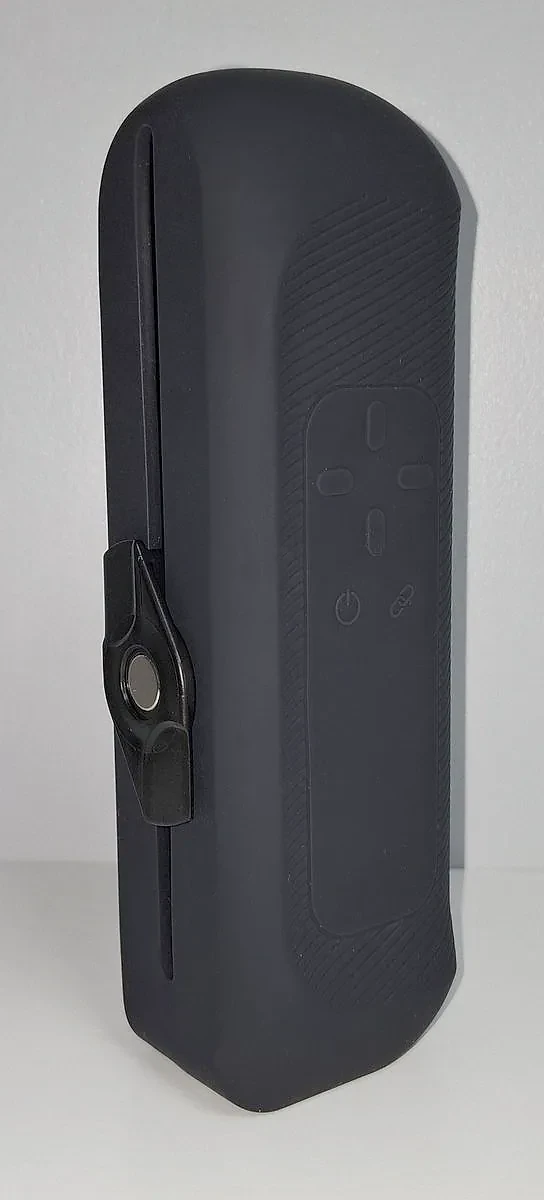
The short verdict: precise, quiet, and easy to maintain
I came to the Handy 2 after three years of near-daily use on a Handy 1, so I knew what to look for. Its core is precise motion that an app can steer in real time, over Wi-Fi, and on that point it does even better than my Handy 1. Almost everything around that core has improved too. The battery is the big change. It frees you from the cable, and it also brings the two things I would fix first.
- Precise sync. Scripts and live changes land with no delay I can feel, even sharper than on my Handy 1.
- Very quiet. The quietest stroker I have owned or tested, with far less motor noise than the Handy 1.
- Easier to use and maintain. The sleeve clips off in one move, a hands-free arm screws straight onto the body, and upkeep is simpler.
- Cordless, but watch the battery. Close to 3 hours per charge in calm sessions, but it stopped on me mid-session three times, and there is no charger in the box.
This review covers the Standard model. I have not used the Pro, so anything about the Pro here comes from Handy's spec sheet.
Disclosure: Handy sent me this Handy 2 and the Silk Sleeve for free. Thanks to them for that. They did not approve this review and had no say in what I wrote.
Disclosure: Some links on this page are affiliate links. I may earn a commission at no extra cost to you. It funds The Edgy and never affects what I recommend.
How it drives The Edgy
The Edgy is a free edging player that runs in your browser. You tell it how close you are, and it answers the other way: the nearer you get, the more it slows the device, shortens the stroke and adds pauses, so you stay on the edge longer. For that to feel right, the device has to react the moment the app asks.
The Handy 2 connects over its own Wi-Fi, straight from the browser, with no app in the middle. In my sessions its motion was very precise. Funscripts (timed motion files that sync a stroker to a video) play with no lag I can feel, and when The Edgy changes speed or depth, the device follows at once. It even feels sharper than my Handy 1.
Setup is quick. The first time, you use Handy's app over Bluetooth to connect the device to your Wi-Fi. After that it joins the network on its own, and I have not had a single connection problem since.
The Handy 2 can also connect over Bluetooth, through the free Intiface app. It works, but I strongly recommend Wi-Fi: that is the connection that gives the precise, lag-free motion I describe here.
The specs, sourced
Figures come from Handy's official store page, help center and blog. Where a line says "my use", it is what I saw on my own unit. A note under a value is the detail that keeps the line honest.
Model tested
Handy 2 Standard
Handy also sells a Pro version. I have not used it, so its figures below come from Handy's spec sheet.
Stroke
0-125 mm (0-4.92 in)
15 mm (0.59 in) more than the Handy 1, which has 110 mm (4.33 in).
Speed
32-400 mm/s (Pro: 32-450 mm/s)
Handy publishes the Handy 2 in mm per second only, with no strokes per minute figure, so I do not convert it. The Pro also has an overclock mode up to 800 mm/s, and using it voids the warranty.
Battery
About 1 hour (Handy's rating)
My use: close to 3 hours on a full charge in calm sessions, about 1 hour 30 with intense motion. Handy gives 1 to 3 hours for a full charge. Handy rates the Pro at about 5 hours.
Charging
USB-C, no charger in the box
Handy recommends a 60 to 65 W USB-C charger with Power Delivery, ideally 20 V at 3 A or more, to play while it charges. Below 15 V, the motor is switched off while plugged in and the device only charges, slowly.
Noise
Under 60 dB
Handy's figure. To my ear, the quietest stroker I have owned or tested.
Weight
805 g (1.77 lb), Pro 810 g (1.79 lb)
Connectivity
Wi-Fi + Bluetooth 4.2
The Edgy connection
Native Wi-Fi (recommended), or Bluetooth via Intiface
Handy's app is only needed once, to put the device on your Wi-Fi. Bluetooth through the free Intiface app works too, but Wi-Fi gives the most precise motion.
Hands-free
Two built-in mounting points
Standard quarter-inch thread, the same as a camera tripod. Handy's Desk Mount Kit is sold separately: it is not in the box.
In the box
TrueGrip Gen 3 sleeve, band, ClickOn sleeve holder, USB-C cable
No charger and no storage case. The Pro adds a sleeve dryer and a travel pouch.
Fleshlight support
Announced, not on sale yet
Handy has said it is working on a Fleshlight adapter, but none is on sale yet. I tried a Fleshlight anyway: see below.
I do not list prices: they differ by region and change with sales. The store link further down shows the current one. Handy figures checked in October 2026; battery times are from my own use.
Stroke and speed
The Handy 2 gives you 125 mm (4.92 in) of stroke, 15 mm (0.59 in) more than the Handy 1. That does not sound like much, but you notice it on moves that take their time over the whole length. Long, slow strokes from one end to the other are where it feels best, and it handles slow and fast motion equally well.
One thing to know about top speed: the device does not reach the end of the stroke. You can push it very fast, but it turns around before it gets there. So at its fastest, the stroke you get is a little shorter than the one you set.
That fits the Standard's rated top speed of 400 mm/s. When a move asks for more speed than that, the device cannot cover the whole length in time, so it turns early. The Pro is rated faster, but I have not tested it.
Noise
This is where the Handy 2 surprised me most. It is the quietest stroker I have owned or tested, and clearly quieter than my Handy 1, whose electric motor noise is much more present. Handy rates it under 60 dB.
If noise does not bother you much, you can use it without headphones. I still wear a headset, out of habit and for comfort, but going without is fine.
Quiet does not mean silent, though. If you need to stay discreet with people in the next room, it can still be heard: keep away from the top speeds.
Hands-free on the built-in mounts
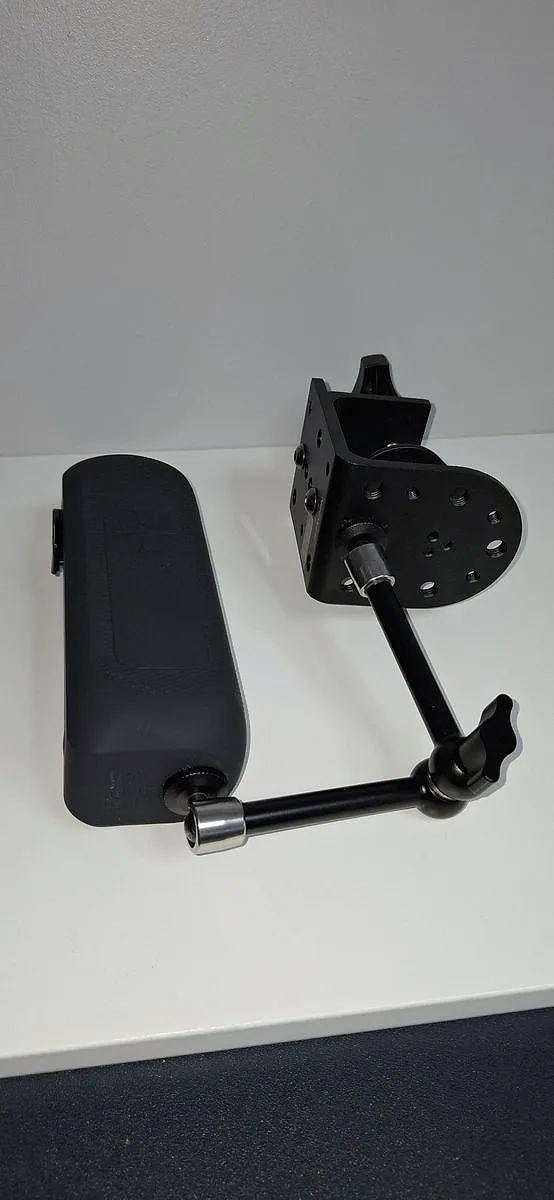
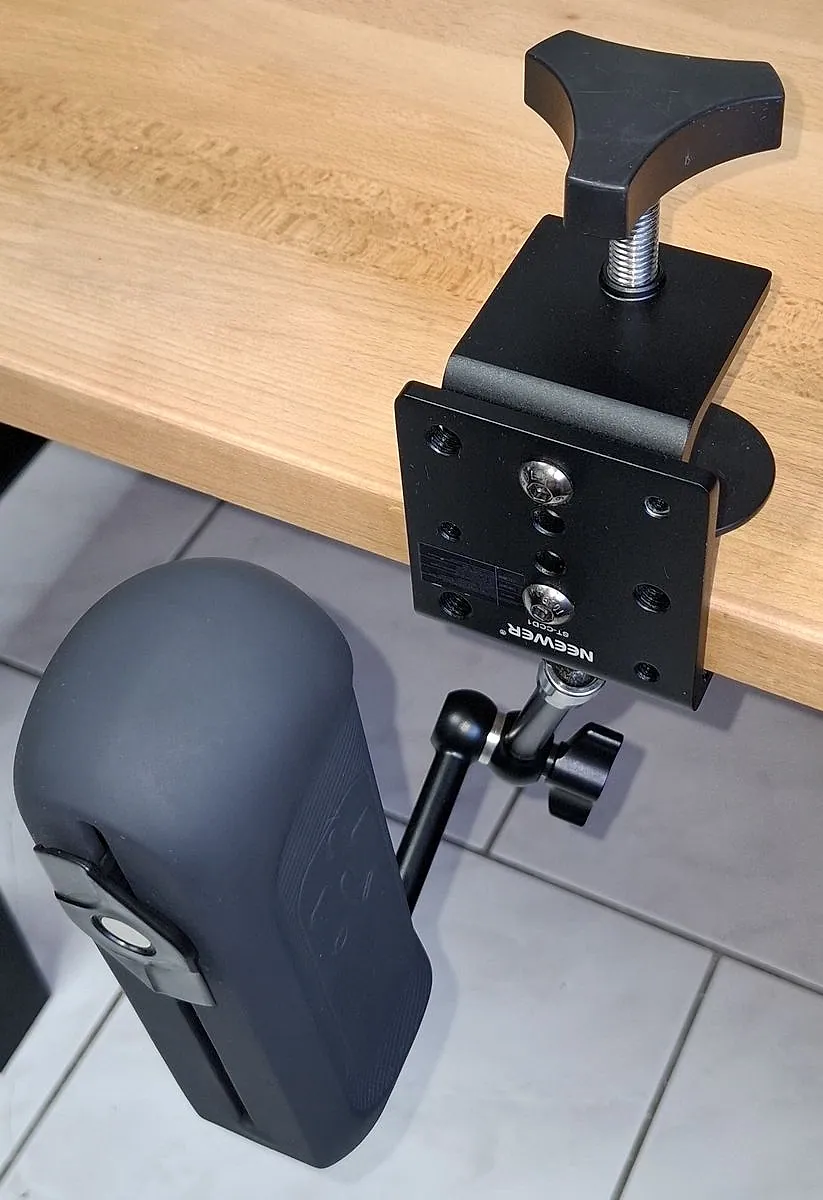
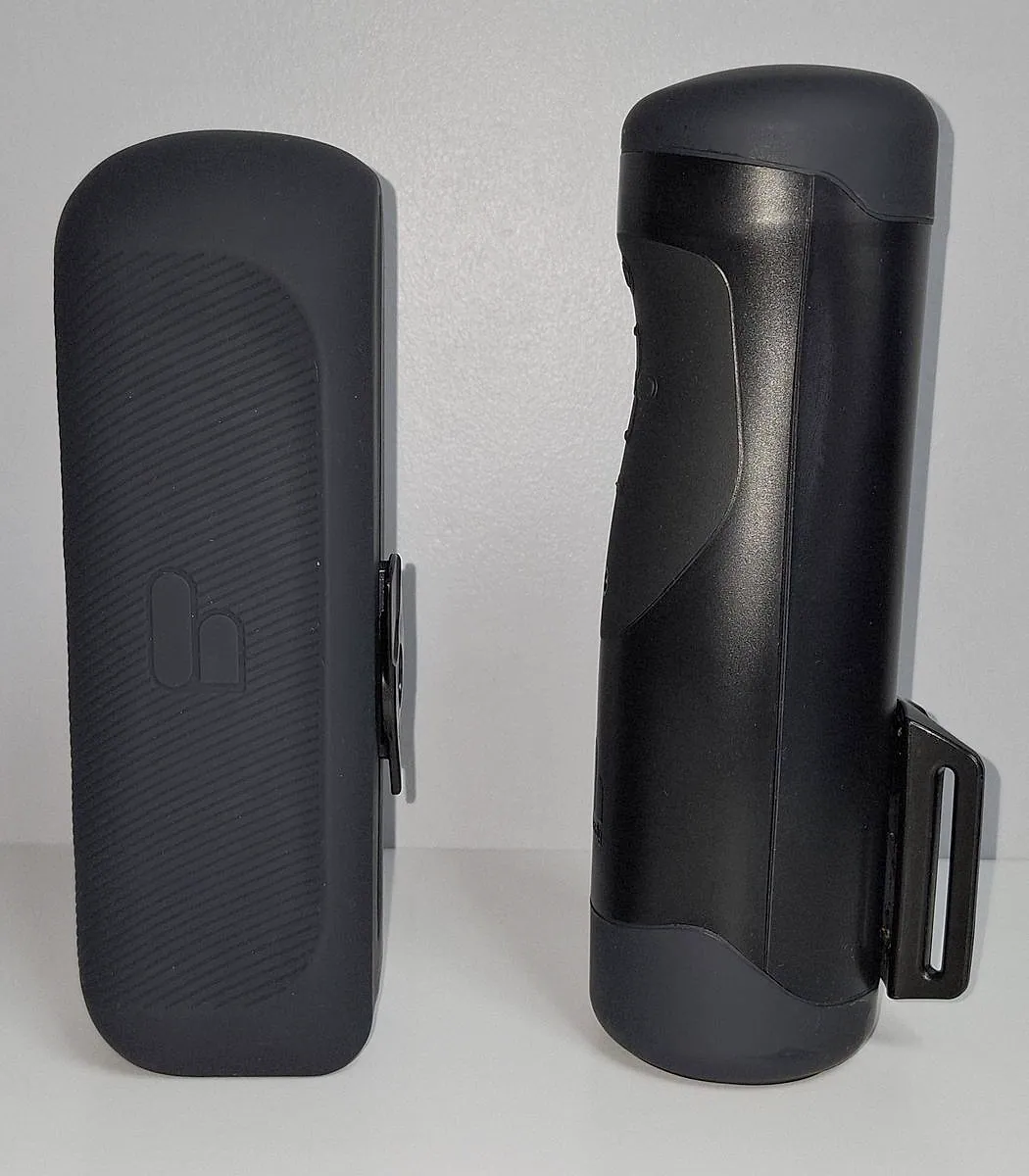
Hands-free is how I use a Handy most of the time, and the Handy 2 makes it simpler. The body has two built-in mounting points with a standard quarter-inch thread, the same as a camera tripod, so a camera-style arm screws straight into them. I reused the clamp and arm from my Handy 1 setup, described in my hands-free guide. The tripod ring that holds my round Handy 1 does not fit around the Handy 2's more rectangular body, but I did not need it. I found a setup that suits me without trouble: it takes less room and holds well.
One thing I keep an eye on. Each stroke pushes and pulls on the mounting point you use, and over months that is where something could break. To limit the strain, I use the point on the bottom of the device, so the arm sits in line with the motion. If you would rather buy a ready-made solution, Handy sells a Desk Mount Kit that fits both generations. It is not in the box.
Sleeves and the new clip
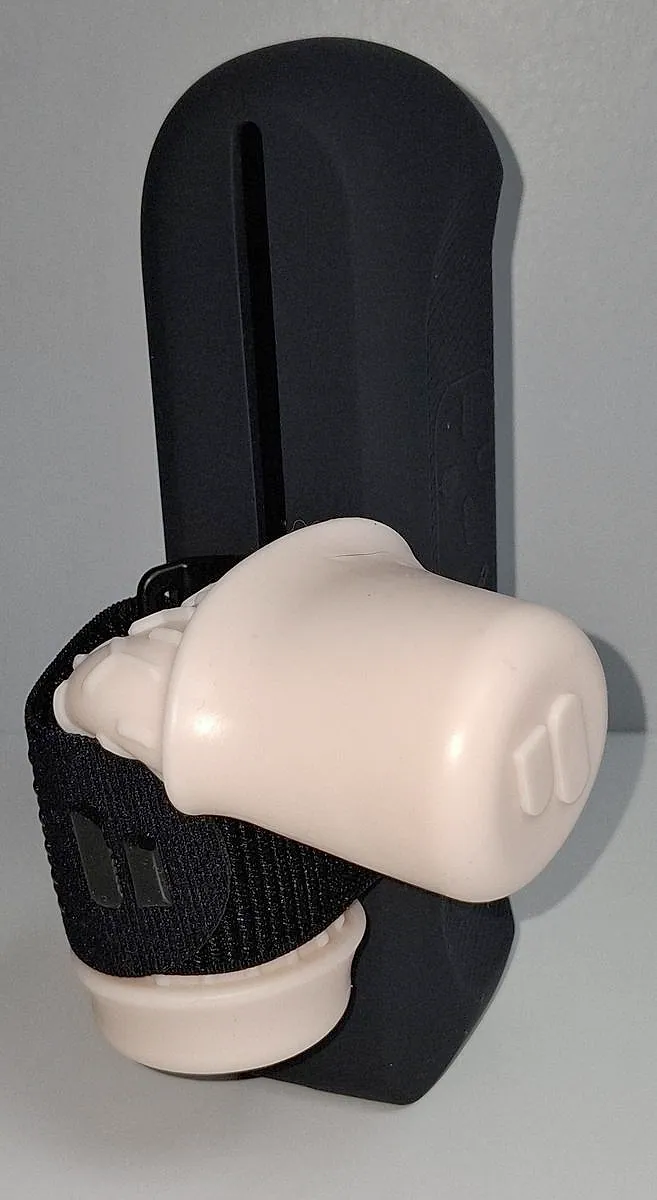
A band holds the sleeve on the device, and all of Handy's sleeves fit, including the ones from a Handy 1. The band sits on the ClickOn sleeve holder, a clip: the band and the sleeve come off the device together in one move, and go back on the same way. I doubted I needed that, but in practice it is clearly easier than on my Handy 1. The band also feels better made and stiffer, which helps, because sleeves tend to be soft.
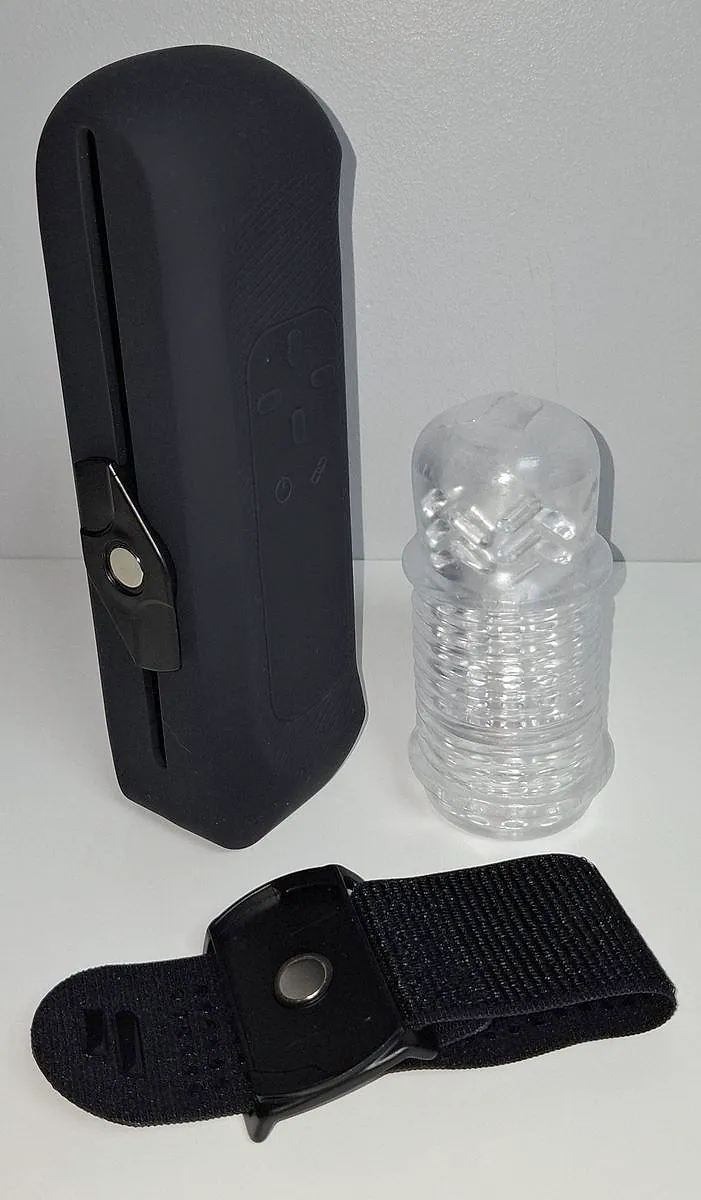
The sleeve in the box is the TrueGrip Gen 3. It does the job, but the inner texture at the top end felt less worked to me than on other sleeves. That is a personal impression, not a measurement. The Standard comes without a storage case (the Pro gets a travel pouch). If you are buying, I would still add another sleeve to the order: the Gen 2 or the Lips are the two I would pick. My sleeve guide compares the whole range.
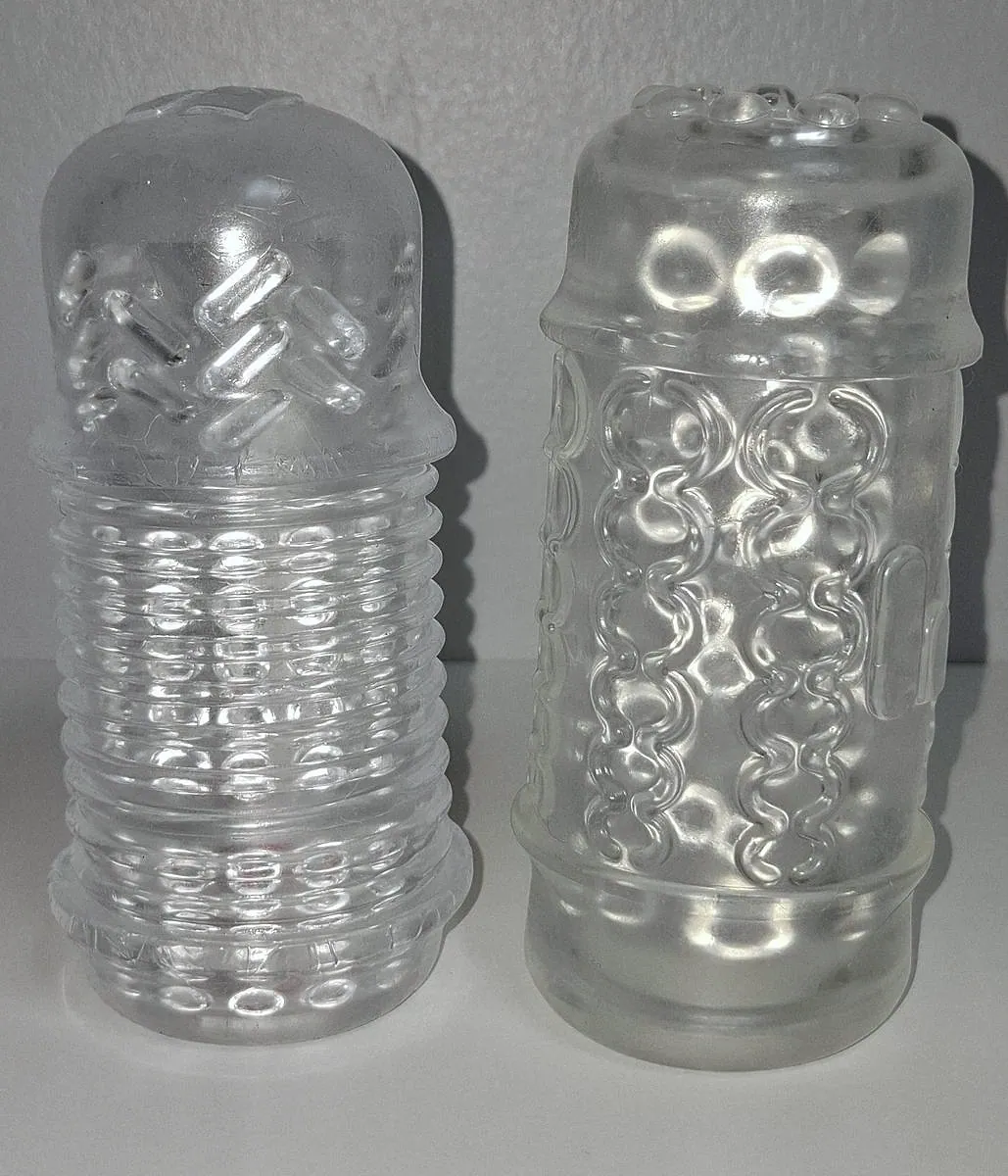
The Silk Sleeve
Handy also sent me its Silk Sleeve to try. It is made of silicone rather than TPE, and it is very soft. The feel stays close to the TPE sleeves, and the softness makes long sessions more pleasant, with less irritation. Its big flaw is that it is too soft: it slipped out of the band, or slid inside it, several times. Maybe I have not found the right adjustment yet, so take this as an early note. Use it with water-based lube only: Handy says silicone-based lube damages its sleeves.
Disclosure: Some links above are affiliate links. I may earn a commission at no extra cost to you. It funds The Edgy and never affects what I recommend.
Build, care and cleaning
It looks clean, feels soft to the touch, is nicer looking than the Handy 1, and it is light. The buttons and status lights are simple and discreet.
The big bonus is upkeep. On my Handy 1, the one service job is greasing the drive screw. The Handy 2 makes it easier: the drive screw is easy to reach, and there are two oil points for the two guide rods, hidden under the soft skin of the body and marked by small dimples. Handy's official maintenance video shows the method: you push the oil syringe through the skin at each dimple, onto the rod underneath, and squeeze for three seconds. Handy sells a maintenance kit with the grease, the rod oil and the syringes. With all of that documented by the maker, this is a device built to last, and the battery is the only part I see limiting its life.
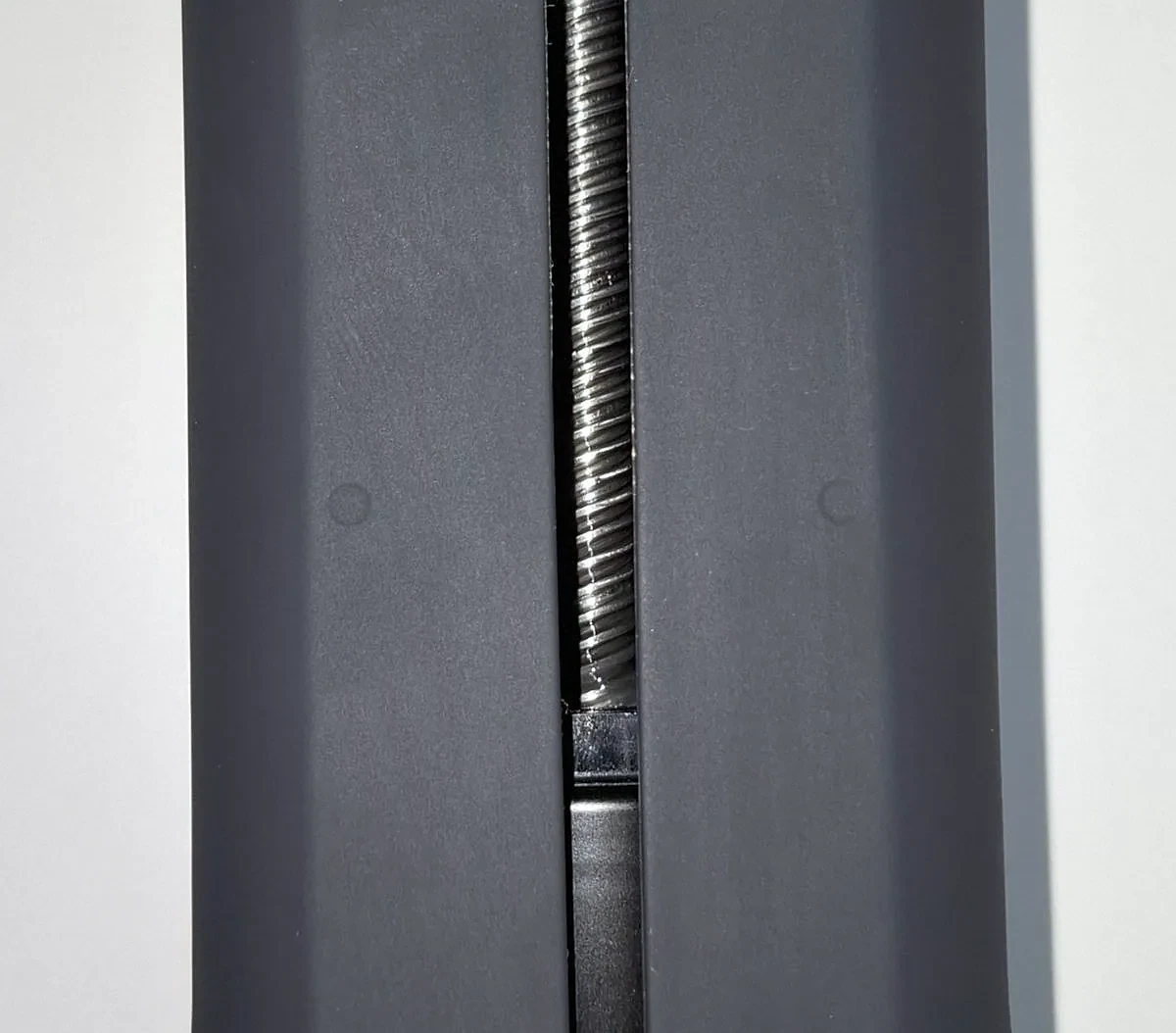
Cleaning is simple. Unclip the sleeve with its band and rinse the sleeve under the tap, turning it inside out like a sock. Wipe the band and the clip with a wet cloth. If the body needs it, a cloth dampened with warm water does the job.
Battery life, and the charger you need
The Handy 2 runs on a battery, which the Handy 1 never did. Handy rates the Standard at about 1 hour per charge, and mine did better: close to 3 hours of calm use, and about 1 hour 30 with more intense motion. Handy says a full charge takes 1 to 3 hours. Mine charges fast, though I have not timed it.
There is no charger in the box, and the one you pick matters. Handy recommends a 60 to 65 W USB-C charger with Power Delivery, ideally one that gives 20 V at 3 A or more. With that, you can play while it charges. With a charger that cannot reach 15 V, the motor is switched off while the device is plugged in, and it only charges, slowly. Many phone chargers only go up to 9 V, which is not enough, so pick up a laptop-style charger before your first session. Handy sells its own 65 W Fast Charger, rated 20 V at 3.25 A. The one I use is another 65 W USB-C charger, sold for Lenovo ThinkPad laptops. Its listing gives 20 V at 3.25 A, and also 15 V, so it meets Handy's figures too.
The real problem is the warning. Handy's help pages list a low-battery LED notice, but I never saw it before the device stopped: during a session I watch the screen, not the device, and in my hands-free setup the LED is out of sight anyway. That happened to me three times, each time in the middle of a session.
I also checked what the Handy 2 tells an app over Wi-Fi, which is how The Edgy talks to it. On firmware 4.3.0, it sends a battery event only when you plug in or unplug the charger, and when the battery reaches 0% at the exact moment the device shuts down. Nothing is sent while the level drops. So an app on Wi-Fi, mine included, cannot show a live battery gauge or warn you before it stops. I have not checked what the Bluetooth connection reports. Until Handy changes that, charge it before a long session, or play with it on a 60 to 65 W charger.
The other open question is how the battery will age. My Handy 1's motor has held up for three years. A battery wears out with time, and I cannot tell you yet how this one will do. I will add to this page as it ages.
Disclosure: Some links above are affiliate links. I may earn a commission at no extra cost to you. It funds The Edgy and never affects what I recommend.
Fleshlight: what I tried
An official Fleshlight adapter for the Handy 2 is in the works, according to Handy, but you cannot buy one yet. I wanted to see what you can do today, so I tried a Fleshlight in its case. With some force, the band does hold it. But the setup is not made for it: the bottom of the case rubs against the device, and over time that would damage the soft finish.
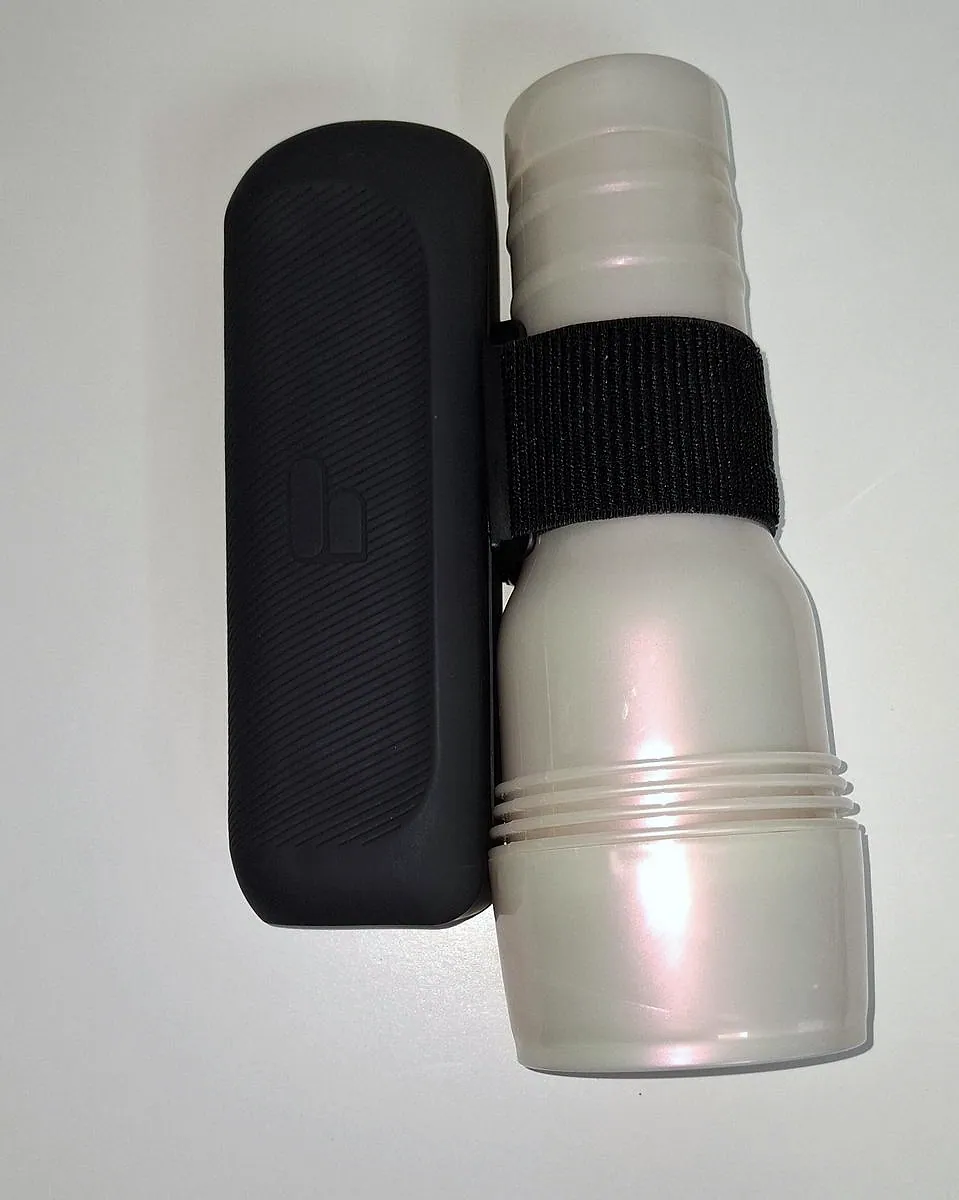
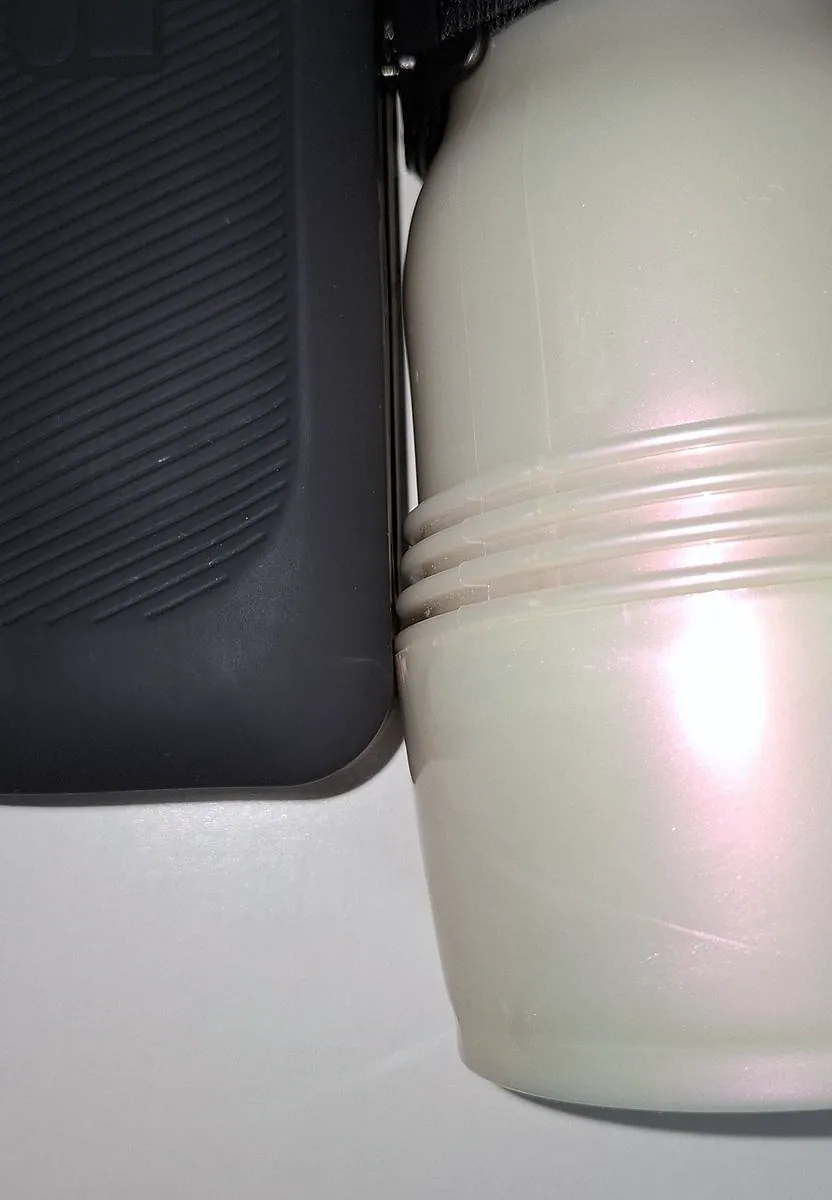
I ran it anyway, to see. The motor clearly works harder to lift the heavier Fleshlight, and it tends to come down faster than it goes up. On the plus side, I saw no overheating, even under that load.
Some owners 3D print adapters that hold a Fleshlight properly. I have not tried one. My guess is that the official adapter will be a real plus for Fleshlight owners if the price is fair, but a Fleshlight is heavy, so expect to give up a little speed with one.
What let me down
My first unit was faulty. I sent Handy's support the device logs and a video of how it behaved when I plugged it in, and they traced the fault to the battery. A replacement arrived very quickly, with no argument. The support was fast and pleasant to deal with. I was not the only one: in May 2026, Handy said publicly that some units had charging faults, that its latest production batches fix them, and that confirmed cases get a replacement.
Not much comes in the box. No charger, a plain sleeve and no storage case. I understand that Handy wants to sell sleeves, and the range is good, but together it can make the first session disappointing. Plan to buy another sleeve, a hands-free setup and a 60 to 65 W charger from the start.
The battery questions. A low-battery warning I never caught in time, and no way yet to know how the battery will hold up over the years. Both are covered in the battery section above.
Handy 1 vs Handy 2, after using both
I have run a Handy 1 for three years and now a Handy 2, so this comparison is from use, not from the two spec sheets side by side. The full story of the first one is in my three-year Handy 1 review.
Sync with The Edgy
Handy 1Precise, over native Wi-Fi
Handy 2Same link, even sharper in my use
Noise
Handy 1Clearly audible electric motor noise
Handy 2Much quieter, still audible at top speed
Stroke
Handy 1110 mm (4.33 in)
Handy 2125 mm (4.92 in), felt on slow full-length moves
Power
Handy 1Mains only, never runs out
Handy 2Battery: about 3 h calm, 1 h 30 intense in my use, and it ran flat on me mid-session
Sleeves
Handy 1Handy sleeves, held by a band
Handy 2Same sleeves, plus a clip and a stiffer band
Hands-free
Handy 1Mount kit, or a ring on photo gear
Handy 2Built-in mounting points, a camera arm screws in
Upkeep
Handy 1Regrease the drive screw
Handy 2Easier drive screw access, plus oil points for the guide rods
Heat
Handy 1One heat cutout in three years, under extreme use
Handy 2None so far, even lifting a Fleshlight
Status
Handy 1Discontinued by the maker, mine still runs daily
Handy 2Current model
Should you upgrade? If the quieter motor, the sharper sync and the extra stroke matter to you, I think it is worth it, and the switch costs less than it seems: your sleeves and your hands-free clamp and arm carry over. The battery only counts if you move the device around. Mine stays on my desk, so for me it is not a reason to change.
My take
After three years on a Handy 1, the Handy 2 feels like the same idea, done better. The motion is even more precise, it is much quieter, and it is easier to keep in good shape. The battery is the trade: it frees you from the cable, but it brings the two things I would fix first: a low-battery warning you cannot miss, and a charger in the box.
So go in prepared. Add a 60 to 65 W USB-C charger and a better sleeve, set up a mount, and charge it before long sessions. With that done, for the way I use a stroker, at my desk, hands-free and driven by an app, it is the best one I have used. That is a personal view, and the right device depends on what you need.
Where to buy the Handy 2
The Handy 2 is sold on Handy's own store, where you will find the live price, the Pro version and the bundles. Remember what the box leaves out: a charger, a mount and a sleeve you will want to keep.
Handy 2 discount code
Reader discount
15% off at checkoutThe Handy 2 only, Standard or Pro
- Other items in your cart stay at full price
- Not valid on bundles
- Not valid on items already on sale
The button below opens Handy's offer page with the code already applied. On Handy's main store, enter it at checkout.
Disclosure: Some links above are affiliate links. I may earn a commission at no extra cost to you. It funds The Edgy and never affects what I recommend.
Still deciding between this and the others? The stroker comparison puts the Handy 2 next to the Kiiroo Keon 2 and the Lovense Solace Pro, on the points that matter for edging.
Frequently asked questions
Is the Handy 2 worth it?
For app-driven play, yes. I have used a Handy 1 almost every day for three years, and the Handy 2 keeps what made it worth owning: software can steer it in real time over Wi-Fi, so synced videos and interactive apps feel precise. On top of that it is much quieter, it has a longer stroke, the sleeve swaps faster and it is easier to maintain. Plan for two extras the box does not include: a 60 to 65 W USB-C charger and a better sleeve. And keep an eye on the battery: mine ran flat mid-session three times before I noticed any warning.
What is the difference between the Handy 1 and the Handy 2?
Having used both, the core is the same: precise motion over Wi-Fi that apps can drive. The Handy 2 is clearly quieter, its stroke is 125 mm (4.92 in) instead of 110 mm (4.33 in), and it runs on a battery where the Handy 1 needs a socket. The sleeve now clips off with its band in one move, the body has built-in mounting points for a hands-free arm, and the guide rods have their own oil points. The trade-off is the battery: no charger in the box, and a low-battery warning I never noticed in time. The Handy 1 is discontinued, so the Handy 2 is the one you can buy.
Is it worth upgrading from the Handy 1 to the Handy 2?
If lower noise, more precise motion and a slightly longer stroke matter to you, I would say yes. You also keep what you already own: your Handy sleeves fit the Handy 2, and so does a hands-free clamp and arm. The battery is the part that depends on you. I only use mine at my desk, so going cordless is not an argument for me, but it can be one if you want to move the device around.
How long does the Handy 2 battery last?
Handy rates the Standard at about 1 hour per charge. Mine did better: close to 3 hours in calm sessions and about 1 hour 30 with intense, fast motion. Handy gives 1 to 3 hours for a full charge. The catch is the warning: Handy's help pages list a low-battery LED notice, but my Handy 2 ran flat three times mid-session before I noticed one: my eyes were on the screen, and in my hands-free setup the LED is out of sight. Charge it before a long session, or play with it plugged into a strong enough USB-C charger. On firmware 4.3.0 the device only reports its battery to a Wi-Fi app when the charger is plugged in or out and at shutdown, so such an app cannot show a live gauge.
What charger does the Handy 2 need?
There is no charger in the box, so you need your own. Handy recommends a 60 to 65 W USB-C charger with Power Delivery, ideally one that gives 20 V at 3 A or more. With that, you can use the Handy 2 while it charges. With a charger that cannot reach 15 V, the motor is switched off while the device is plugged in: it only charges, and slowly. Many phone chargers stop at 9 V, so a 65 W laptop-style USB-C charger is the safe choice. Handy also sells its own 65 W Fast Charger.
How loud is the Handy 2?
Quiet for a motorised stroker. Handy rates it under 60 dB, and it is the quietest stroker I have owned or tested. It is clearly quieter than my Handy 1, whose electric motor noise is much more present. You can use it without headphones if noise does not bother you much; I still wear a headset out of habit and comfort. It is not silent, though: if people in the next room must not hear it, stay away from the top speeds.
Can you use the Handy 2 hands-free?
Yes. The body has two built-in mounting points with a standard quarter-inch thread, the same as a camera tripod, so a camera-style arm screws straight into them. That is how I run mine with a clamp and arm I already owned. Handy also sells a Desk Mount Kit for it, but it is not in the box. Each stroke pulls on the mounting point you use, so I use the one on the bottom of the device: the arm then sits in line with the motion and takes the least strain.
Does a Fleshlight fit the Handy 2?
Not properly yet. Handy has said it is working on a Fleshlight adapter for the Handy 2, but none is on sale yet. I tried a Fleshlight in its case anyway: with some force the band holds it, but the bottom of the case rubs on the device and could damage its finish, and the motor clearly struggles to lift the extra weight. I saw no overheating. Some owners 3D print adapters for it. If the official one arrives at a fair price it should help, but expect a little less speed with a heavy Fleshlight.
Which sleeve should I get with the Handy 2?
The TrueGrip Gen 3 sleeve in the box does the job, but its inner texture at the top end felt less worked to me than on other sleeves. That is a personal impression, not a measurement. The Standard also comes with no storage case. Handy's sleeves fit the Handy 2, so I would still add another one to the order, the Gen 2 or the Lips. Handy also sent me its Silk Sleeve: it is silicone, very soft, and easier on the skin in long sessions, but it is so soft that it slipped out of the band several times for me. If you try it, use water-based lube only.
Handy 2 or Handy 2 Pro?
I have only used the Standard, so this part is from Handy's spec sheet. The Pro is faster, 32 to 450 mm/s against 32 to 400 mm/s, has a bigger battery rated about 5 hours against about 1 hour, adds an overclock mode up to 800 mm/s that voids the warranty, and comes with a sleeve dryer and a travel pouch. Weight is almost the same, 810 g (1.79 lb) against 805 g (1.77 lb). At its very top speed my Standard shortens the stroke, which is where a faster model could help, but I have not tested the Pro to confirm it.
Is there a discount code for the Handy 2?
Yes. Handy set up the code EDGY15 for readers of this review: 15% off the Handy 2, Standard or Pro, and it works worldwide. Only the Handy 2 itself is discounted: other items in your cart stay at full price, and the code does not work on bundles or on items already on sale. The link on this page opens Handy's offer page with the code already applied. On Handy's main store, enter it at checkout.
Where this review comes from
I build The Edgy, the edging app that drives the Handy 2, and I have used a Handy 1 almost daily for three years, often for hours while writing code against it. This review is hands-on, on a Handy 2 Standard I have had since September 2026, used with The Edgy, with funscripts and hands-free.
The published figures, stroke, speed, battery rating, weight and noise, come from Handy's official store page, and the charger, box and maintenance details from Handy's blog, help center and maintenance video. Battery times, noise, sync and everything about sleeves, mounting and upkeep are from my own use. I have not used the Pro, so what I say about it is from the spec sheet only.
How this page is funded
The Edgy is free. The whole player, the seven built-in behaviors, the built-in music sets and the full editor, with no account, no subscription and no ads. The one thing I sell is an optional pack of ready-made behaviors on Ko-fi, for people who would rather not build their own. Nothing in the player is locked behind it.
Some links on this page are affiliate links. If you buy through one, the brand pays me a commission at no extra cost to you, and that is what pays for the hosting and the hours that go into building this. It is the reason the app can stay free.
Free device. Handy sent me this Handy 2 and the Silk Sleeve for free. Thanks to them for that. They did not approve this review and had no say in what I wrote.
What it does not buy: my opinion. I am one developer, not a review farm. No brand pays for a spot on this page, for a ranking, or for a good word. Commission rates differ between brands and I do not rank on them. Specs are sourced from the manufacturers and stated as such, hands-on impressions are my own, and the shortcomings stay in even when they cost me a sale. If a device is not right for you, I would rather say so than sell it to you.
More detail in my legal notice.